




Twilio A2P 10DLC Registration (2026): Steps, Fees and Approval
A2P 10DLC is the carrier registration for business texts from US local numbers: a $4.50 or $46 brand, a $15 campaign review, $1.50 to $10 a month, and 10 to 15 days.

Key takeaways
- Business texts from US local numbers need an approved brand and campaign; unregistered texts are blocked.
- Budget $4.50 or $46 per brand, $15 per campaign review, then $1.50 to $10 a month.
- Campaign review currently takes 10 to 15 days, and the opt-in description causes most rejections.
- Edit and resubmit a rejected campaign instead of deleting it, so the vetting fee is charged once.
A2P 10DLC in plain terms
A2P 10DLC is the registration US carriers require before a business can text people from a standard 10-digit phone number: you register a brand (who is sending) and a campaign (what you send and how people agreed to get it). On Twilio, as of October 16, 2026, that costs $4.50 or $46 for the brand, a $15 campaign review fee and $1.50 to $10 a month, and Twilio currently says campaign review takes 10 to 15 days.
It applies to anyone sending SMS or MMS from a local number to US phones. Twilio's A2P 10DLC overview is blunt about scope: carriers treat every message sent through Twilio as application-to-person traffic, so a two-person Shopify store needs to register just like a bank does.
Skipping it is no longer an option. Since September 1, 2023, Twilio has blocked all unregistered 10DLC messages to US numbers with error 30034, and its messaging rates still apply to the blocked texts.
Three things A2P 10DLC does not cover, so you can stop worrying about them here:
- Phone calls. Registration is for texts. Calls from the same number fall under calling rules and caller ID authentication instead.
- Toll-free numbers and short codes. Each has its own approval process (toll-free verification is covered below).
- Consent itself. Registration tells carriers how you collect consent. It does not create consent. The rules on who you may text live in our guide to calling and texting consent.
Pick the brand type that fits your store
Your brand type decides your fees, your daily volume and how many numbers you can text from. The deciding question is whether the business has a tax ID (an EIN in the US).
| Sole Proprietor | Low-Volume Standard | Standard | |
|---|---|---|---|
| Who it is for | US or Canadian sellers with no EIN or business number | Businesses with a tax ID sending under about 6,000 segments a day | Businesses with a tax ID that need more volume |
| Campaigns per brand | 1 | Up to 5 | Up to 5 |
| Numbers per campaign | 1 | Several | Several |
| Daily limit to T-Mobile | 1,000 segments (about 3,000 across US carriers) | 2,000 segments (about 6,000 across US carriers) | From 2,000 up to unlimited, set by your Trust Score |
| Brand fee | $4.50 | $4.50 | $46, including secondary vetting |
Limits are from the same Twilio overview and fees from Twilio's A2P 10DLC fee schedule, both checked October 16, 2026.
The rule for stores is simple. If your store is an LLC or corporation, Sole Proprietor is not available to you: Twilio rejects that combination (error 30915) and tells you to register a Standard or Low-Volume Standard brand instead. A store texting checkout links and shipping updates to a few hundred shoppers a day stays far below 6,000 segments, so Low-Volume Standard is the cheap, sensible default. Pick Standard when you send big promotional blasts or need more throughput than the lowest tier.
A true sole proprietor with no EIN registers through Twilio's Sole Proprietor flow: one campaign, one number, and a one-time passcode texted to your own US or Canadian mobile that you must answer within 24 hours.
What registration costs (checked October 16, 2026)
Twilio says it passes registration and carrier fees through with no added cost. Brand and vetting fees went up on August 1, 2025, which is why older guides quote $4 and $44 for brands.
| Fee | Amount | When you pay it |
|---|---|---|
| Brand, Sole Proprietor or Low-Volume Standard | $4.50 one time | When the brand is created |
| Brand, Standard | $46 one time | When the brand is created |
| Campaign vetting | $15 per campaign | At the first vetting decision |
| Campaign, Sole Proprietor | $2 a month | From approval, monthly |
| Campaign, Low-Volume Mixed | $1.50 a month | From approval, monthly |
| Campaign, standard use case (Marketing, Customer Care, Mixed) | $10 a month | From approval, monthly |
| Authentication+ retry (public, for-profit brands only) | $12.50 per retry | Each time the step is retried |
| Vetting appeal | $11 | Per appeal |
| Twilio outbound SMS from a local number | $0.0083 per segment | Per message |
| Carrier fee per outbound SMS segment | $0.0035 AT&T, $0.0045 T-Mobile, $0.005 Verizon | Per message |
| Local phone number | $1.15 a month | Monthly |
Per-message and number prices come from Twilio's US SMS pricing page. The brand fee is charged when the brand is created, even if it then sits unverified, so get the business details right the first time.
Example: a store on a Low-Volume Standard brand with one Low-Volume Mixed campaign pays $4.50 + $15 + 12 x $1.50 = $37.50 in registration fees in year one. Sending 1,000 one-segment texts a month to T-Mobile customers adds about $12.80 a month ($8.30 to Twilio, $4.50 in carrier fees).
How long approval takes
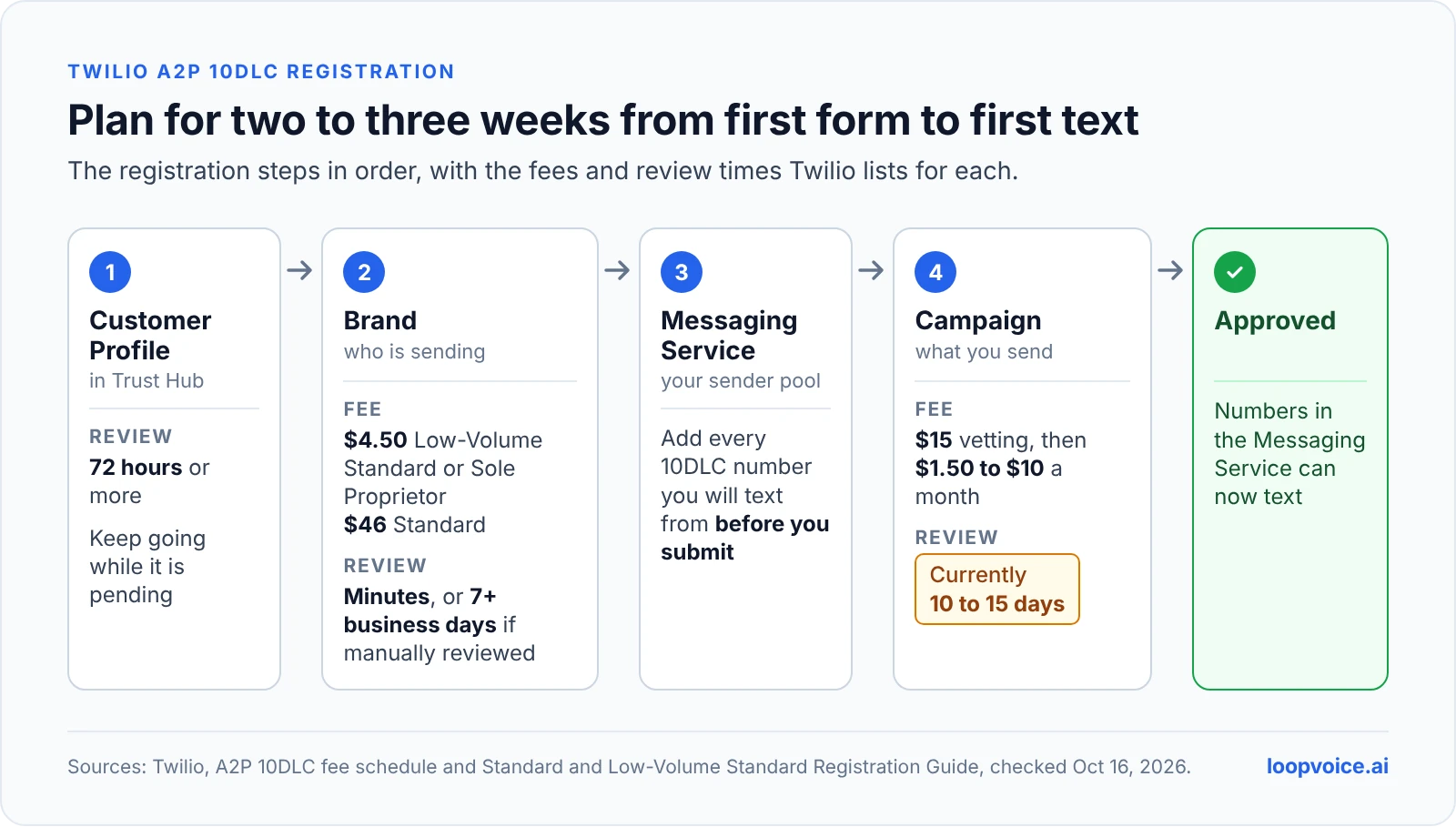
Plan for two to three weeks from first form to first text. These are Twilio's own estimates, checked October 16, 2026:
- Customer Profile (Trust Hub): 72 hours or more, and you can keep going while it is pending.
- Brand: usually a few minutes. If the registry sends it to manual review, seven business days or more.
- Campaign: Twilio's guide says two to three weeks, and a banner on the same page says reviews are currently taking 10 to 15 days.
- New EIN: Twilio's business information checklist warns that a newly issued tax ID can take 30 to 90 days to reach the databases used for validation, so a brand-new LLC may fail brand verification for a reason that fixes itself with time.
The other timelines come from Twilio's Standard and Low-Volume Standard registration guide. If your recovery flow depends on a checkout-link text, register before you need it, not the week you launch.
Register in the Twilio Console, screen by screen
Registration has four parts. Before you open the Console, have these ready:
- The exact legal business name from your IRS CP 575 or 147C letter (not the name on a W-9) and your EIN.
- A live website on your own domain that shows the business, a public privacy policy and public terms.
- A business email on that same domain. Reviewers flag Gmail or Yahoo addresses for corporate brands.
- Your authorized representative's name, job title and phone number.
- The phone numbers you plan to text from, already in your Twilio account.
- Create the Primary Customer Profile. In the Console, go to Messaging > Regulatory Compliance > Onboarding and open the Create Customer Profile tab. This is a one-time identity check, and the business information checklist linked above lists every field and shows where the legal name sits on the CP 575 letter.
- Register the brand. Choose Standard or Low-Volume Standard. Public, for-profit companies must also add a brand contact email and pass a two-factor check (Authentication+).
- Set up a Messaging Service. A campaign needs a Messaging Service with at least one 10DLC number in its sender pool, and one Messaging Service can only be linked to one campaign. Add every number you will text from before you submit, because approval registers the numbers in that service.
- Register the campaign. Pick the use case, write the description, paste 2 to 5 sample messages, describe the opt-in (the message flow), add your privacy policy and terms URLs, tick the boxes for embedded links or phone numbers, and set your opt-in, opt-out and help keywords.
Then wait. If the campaign comes back rejected, edit and resubmit the same campaign rather than deleting it: the $15 vetting fee is charged once per campaign, and a recreated campaign is billed again.
Match the use case to what you actually send
Twilio describes a campaign as a single use case, and carriers suspend campaigns whose real traffic does not match what was registered. Map what you actually send before you choose:
| What your store texts | Use case to register | Why |
|---|---|---|
| Cart and checkout reminders, a checkout link after a call, discount codes | Marketing | They ask for a purchase, and Twilio defines Marketing as promotional content such as sales and offers |
| Order confirmations, shipping and delivery updates | Delivery Notifications or Account Notifications | Status of an order the customer already placed |
| Replies to support questions, return status | Customer Care | Support and account management |
| Two or more of the above from one number | Mixed, or Low-Volume Mixed on a Low-Volume Standard brand | Covers several use cases; Twilio warns Mixed campaigns are likely to get lower throughput and a higher cost per message |
The mapping of store texts to use cases is our recommendation based on Twilio's definitions; when a message could fit two, choose the more promotional one. Registering cart reminders as Customer Care to look tidier is exactly the campaign-to-traffic mismatch Twilio lists as a reason for suspension.
Campaign text that passes review: copy these templates
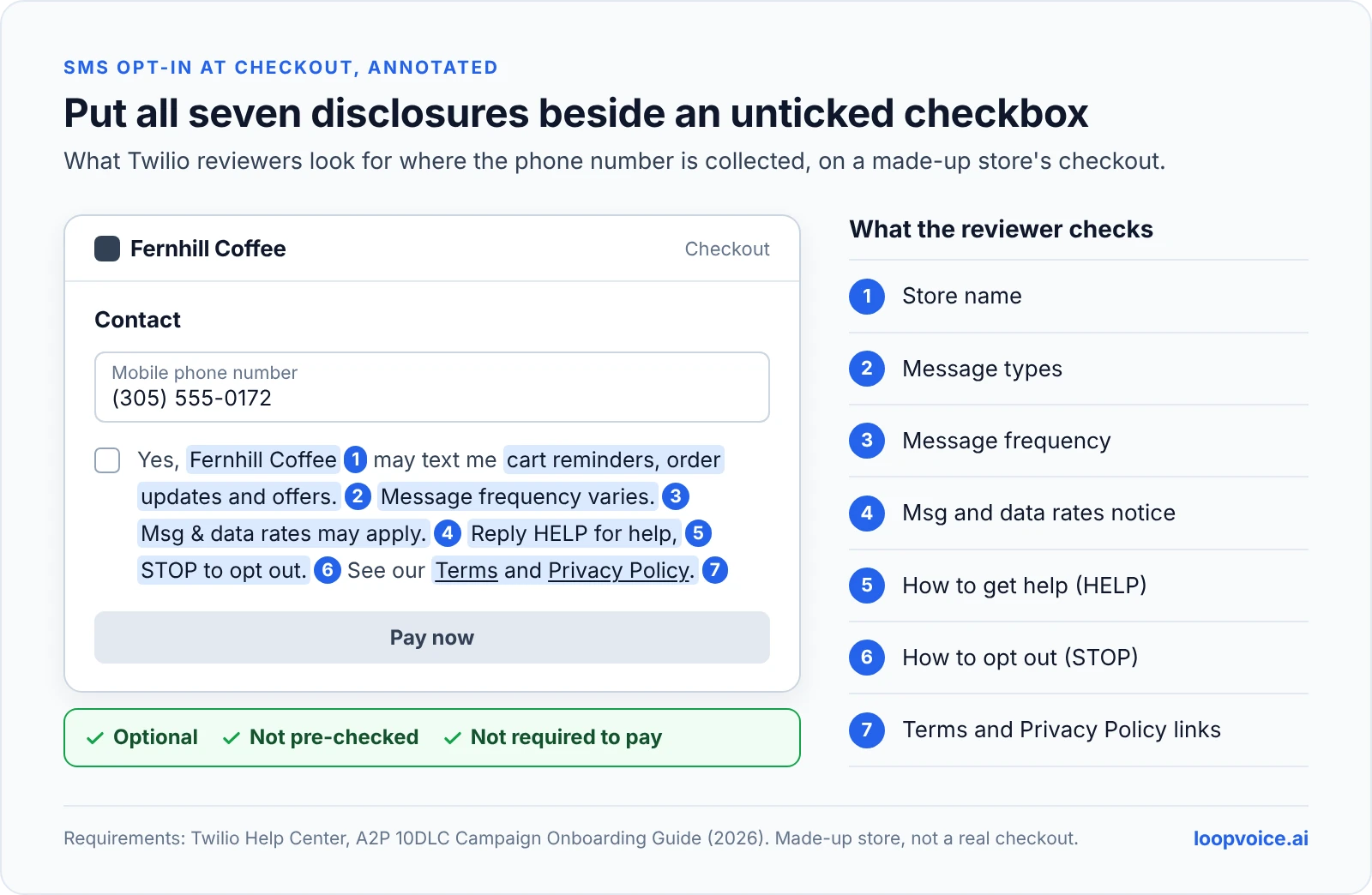
Twilio's campaign onboarding guide calls the message flow (how people opt in) the heart of the registration and the place where most rejections happen. Reviewers check that your sign-up point shows the right disclosures at the moment a phone number is collected. Copy these templates and replace the brackets.
Campaign description (answer who sends, who receives, why):
"Messages are sent by [Store Name] ([yourstore.com]) to shoppers who opted in to text messages at checkout or on our website. Messages include reminders about items left in checkout with a link back to the cart, discount codes, order and shipping updates, and replies to customer service requests."
Sample messages (2 to 5, brand name in each, brackets for variables, HTTPS links on your own domain):
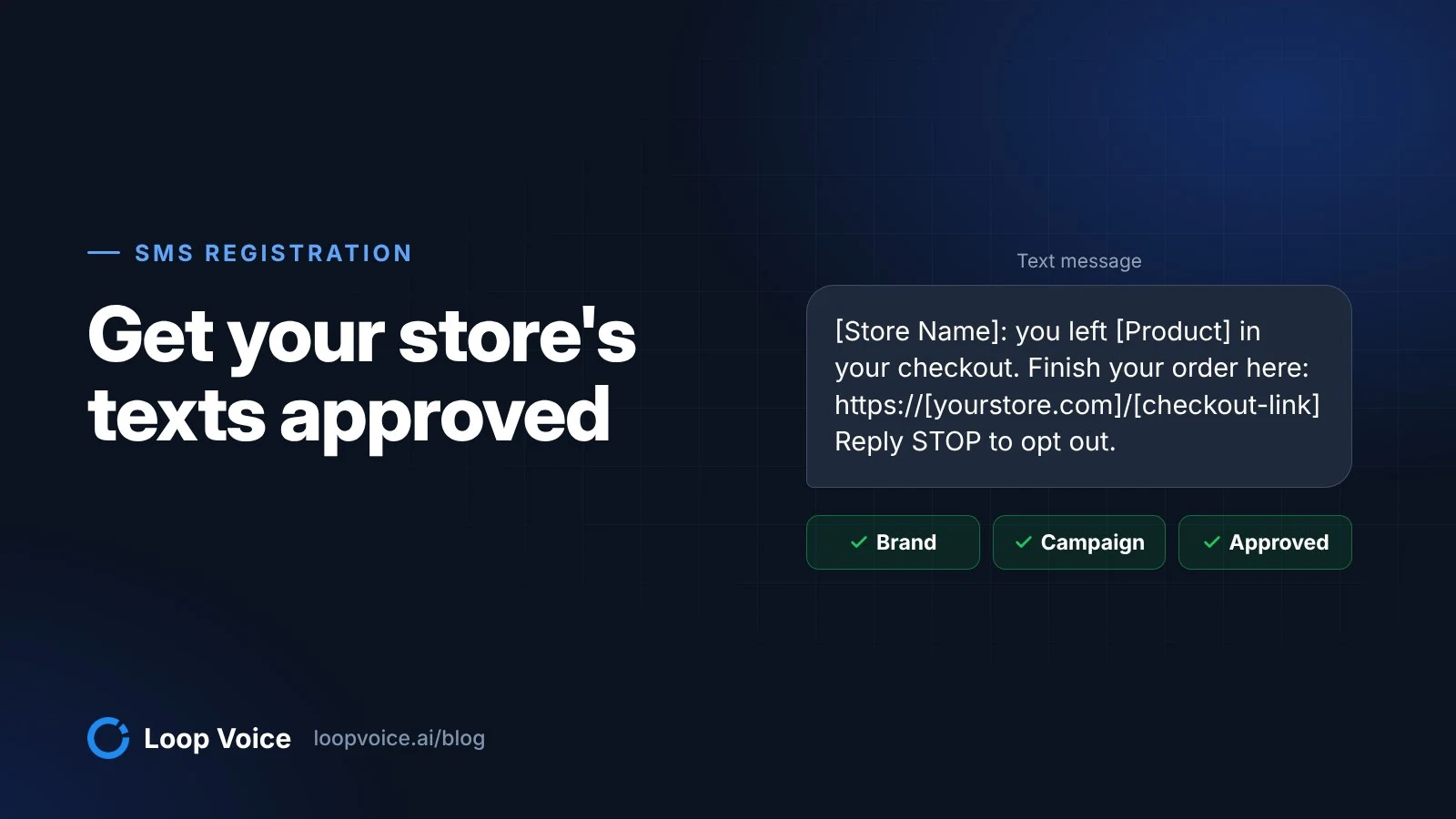
- "[Store Name]: you left [Product] in your checkout. Finish your order here: https://[yourstore.com]/[checkout-link] Reply STOP to opt out."
- "[Store Name]: thanks for the call, [First Name]. Here is the checkout link we discussed: https://[yourstore.com]/[checkout-link] Use code [CODE] at checkout. Reply STOP to opt out."
- "[Store Name]: order [Order Number] has shipped. Track it: https://[yourstore.com]/[tracking-link] Reply HELP for help, STOP to opt out."
Message flow for a Shopify checkout opt-in. In Shopify, go to Settings > Checkout, and in the Marketing opt-in section set SMS to Checkout only. Shopify's help page on collecting contact information warns that the default checkbox text says customers are signing up for news and offers, and that stores sending abandoned cart reminders need to change it. Then describe it like this:
"End users opt in at checkout on [yourstore.com]. After entering a mobile number, they can tick an optional, unchecked box labeled '[exact checkbox text]'; ticking it is not required to complete a purchase. The text next to the box names [Store Name], lists the message types (cart reminders, order updates, offers), says 'Message frequency varies' and 'Msg & data rates may apply', explains 'Reply HELP for help, STOP to opt out' and links to our Terms and Privacy Policy. Screenshot of the checkout opt-in: [public link to image]."
Opt-in confirmation (required for recurring programs): "Welcome to [Store Name] texts! Msg frequency varies. Msg & data rates may apply. Reply HELP for help, STOP to cancel."
Privacy policy and terms. Twilio asks for this sentence in the privacy policy: "We do not sell or share your SMS opt-in data or personal information with third parties for marketing purposes." The terms need your program name and description, message frequency, the rates disclosure, support contact, HELP and STOP instructions, a link to the privacy policy and the line "Carriers are not liable for any delayed or undelivered messages."
Rejection codes stores hit most, and the fix
Since September 15, 2026, Twilio returns more specific rejection codes, shared with toll-free verification. Its rejection code reference lists dozens; these are the ones most relevant to an online store.
| Code | What went wrong | Fix |
|---|---|---|
| 30886 | Description too vague | Say who sends, who receives and why, in plain words |
| 30896, 30909 | Opt-in missing or incomplete | Describe every opt-in method start to finish, with the URL or a hosted screenshot and links to terms and privacy policy |
| 30893 | Samples do not match the use case | Samples that look like real traffic, with your brand name and bracketed variables |
| 30892, 30963 | Public link shortener such as bit.ly | Use your own domain or a branded short domain you own |
| 30964 | A link uses http:// | HTTPS everywhere |
| 30908, 30536 | Privacy policy missing or unreachable | A public privacy policy page with the no-sharing sentence |
| 30882, 30934 | Terms missing | A public terms page with the program disclosures |
| 30913 | Marketing and informational consent bundled | A separate, unchecked marketing checkbox |
| 30923, 30925 | Texting consent required to buy, or box pre-checked | Make the box optional and unchecked |
| 30556 | SMS consent bundled with email or calls | Let shoppers choose SMS on its own |
| 30918 | Store name differs from the legal name | Register the CP 575 legal name and add your store name as a DBA |
| 30891, 30907 | Website down or not matching the brand | A live site that clearly shows the business behind the texts |
Some rejections cannot be fixed by rewording. Content in prohibited categories, including cannabis and CBD (30940), alcohol promotion (30955), tobacco or vape (30958) and firearms (30957), is not eligible for resubmission. If that is your catalog, sort out the messaging plan before you pay for brand registration.
For everything else, follow Twilio's campaign troubleshooting steps: open the failed campaign, record every code, fix each one, then edit and resubmit.
The alternative: toll-free verification
If you already have a toll-free support line, you can text from it instead of registering a 10DLC campaign. Toll-free numbers go through their own toll-free verification, which Twilio says takes about 3 to 5 business days, and unverified toll-free numbers have been blocked from texting US and Canadian phones since January 31, 2024.
| 10DLC local number | Verified toll-free number | |
|---|---|---|
| Approval | Brand plus campaign, about 10 to 15 days for the campaign | Toll-free verification, about 3 to 5 business days |
| Registration fees | Brand $4.50 or $46, campaign $15 plus $1.50 to $10 a month | The 10DLC fees do not apply; Twilio's fee page covers long codes only |
| Number price on Twilio | $1.15 a month | $2.15 a month |
| Default throughput | Set by brand type and Trust Score | 3 segments per second, can be increased |
| Caller ID on calls | Local area code | 8XX prefix |
Choose toll-free for texting when you want approval faster or already publish a toll-free number. Keep a 10DLC local number when the same number also places calls to shoppers. The caller ID tradeoffs for calls are in our comparison of local and toll-free caller ID.
Texts sent by Loop Voice: which registration covers them
Loop Voice can text the shopper during or after a call, for example with the checkout link. Those texts follow the same carrier rules, and which registration covers them depends on where the number lives:
- A number bought inside Loop Voice. No Twilio account is needed; Twilio is optional. Loop Voice describes these numbers as voice and SMS ready. Before you promise a text on calls, ask support which business name your messages are registered under, so the store name in the text matches it.
- A number imported from your Twilio account. The A2P registration is yours. The number has to sit in a Messaging Service tied to an approved campaign whose description and samples include a text sent after a phone conversation, with a checkout link and a discount code.
- A number connected over a SIP trunk (Twilio, Vonage or Telnyx). The trunk carries calls. Check with support how follow-up texts are sent for that setup before you rely on one.
Loop Voice texts carry merge fields for name, product, checkout link and discount code plus the required STOP footer, and a STOP reply lands on the do-not-contact list before the next flow step runs. The rest of the setup, from number to first live call, is in the AI voice agent setup walkthrough, and the full feature list is on the features page.
Texting is one channel among several. If you are deciding what each one should do in cart recovery, read email vs SMS vs phone calls for abandoned carts and, for Klaviyo users, running calls next to a Klaviyo abandoned cart flow. For where a text fits inside a recovery call, see the abandoned cart call playbook, and for finding the checkouts worth texting in the first place, Shopify abandoned checkout recovery, stage by stage.
Frequently asked questions
Can two stores share one A2P 10DLC campaign?
Not if they are separate companies. Twilio rejects a campaign that covers more than one company, and each business needs its own brand and campaign. If both storefronts belong to one legal entity, ask Twilio support how to show both store names before you submit, because reviewers compare the registered brand with the store name that appears in every message.
Does an approved campaign guarantee my texts are delivered?
No. Registration lowers filtering, but carriers can still suspend a campaign. Twilio lists traffic that does not match the registered campaign, spam, phishing and excessive complaints among the reasons. A suspended campaign cannot send messages, its numbers cannot be moved, and you keep paying its monthly fee until the suspension is resolved, so keep your real texts close to your registered samples.
Do I need a new campaign if I start sending win-back texts later?
Usually, yes. A campaign covers one use case, so a Customer Care or Delivery Notifications campaign does not cover promotional win-back offers. Register a Marketing campaign or move to Mixed before you send them. A brand can hold up to five campaigns, and each new campaign has its own $15 review and monthly fee.
Sources
- Programmable Messaging and A2P 10DLC (Twilio, 2026)
- Pricing and Fees for A2P 10DLC Service (Twilio Help Center, 2026)
- Direct Standard and Low-Volume Standard Registration Guide (Twilio, 2026)
- Direct Sole Proprietor Registration Overview (Twilio, 2026)
- A2P 10DLC: Gather the Required Business Information (Twilio, 2026)
- A2P 10DLC Campaign Onboarding Guide (Twilio Help Center, 2026)
- A2P 10DLC Campaign Registration Rejected (Twilio Help Center, 2026)
- Troubleshooting and rectifying Campaigns (Twilio, 2026)
- Toll-Free Message Verification for US/Canada (Twilio Help Center, 2026)
- SMS Pricing: United States (Twilio, 2026)
- US A2P 10DLC is now a fully verified route (Twilio Changelog, 2023)
- Collecting customer contact information (Shopify Help Center, 2026)
Hear it before you decide
Listen to real recovery calls, or see Loop Voice call a test checkout on your own store.