



Features
Everything it takes to give your store a voice
Loop Voice calls your shoppers at the right moment, texts the link that closes the sale and answers when they call you. Then it shows you which conversations brought in which orders. Here's every part of it.
- 5.0 on the Shopify App Store
- 200+ brands
- 100,000+ calls placed
At a glance
Everything inside Loop Voice
Grouped the way a store uses them. Pick any feature to jump to it. 39 features
Sell
6- Abandoned checkoutA call within minutes, while they still want it
- Post-purchase upsellThe next product, offered after the first order
- WinbackA friendly call to customers who went quiet
- Review requestsAsk for the review where people say yes
- Subscriber check-insA monthly call before they think of cancelling
- Inbound supportYour store's number, answered
Automate
5Build
6- Agent builderObjectives, guardrails and objection handling
- Prompt scoreA grade out of 100 before the first call
- VoicesNatural voices, accents and the speed you set
- 32 languagesEnglish, Spanish, Arabic and 29 more
- Custom voiceTrained on your own recordings, on the Scale plan
- Knowledge baseLearns your store from your site and catalog
Test
4Reach
4Learn
5Protect
5Plays
Cart recovery is one of six plays
Each play starts from a moment in the customer's journey and ends in a conversation. Switch on the ones you need.
Abandoned checkout
Calls within minutes of a missed checkout, while the cart is still on their mind, then texts the link.
Starts fromAbandoned checkoutPost-purchase upsell
Turns one order into two with a well-timed call about what goes with it.
Starts fromOrder placedWinback
Checks in with customers who haven't bought in a while and gives them a reason to come back.
Starts fromLapsed customerReview requests
Asks for the review on the phone, where people actually say yes.
Starts fromOrder fulfilledSubscriber check-ins
Calls subscribers each month, before they think about cancelling.
Starts fromActive subscriptionInbound support
Picks up when customers call you and solves the question on the line.
Starts fromIncoming call
Outbound plays start from a store event
- Abandoned checkout
- Order placed
- Order fulfilled
- Second order
- Viewed product
- Added to cart
- Added to list
- Custom event
- Manual
- API
Flows
Build the journey once and it runs on every cart
Wait ten minutes, call, text the checkout link, wait, call again with a discount. Drag it together on the canvas, check the path before it goes live and watch customers move through it.
- Ten store triggers, from abandoned checkout and order placed to a custom event, a manual start or the API, with a delay if you want one.
- Steps you can stage. Every wait, call, text and branch can be Draft, Manual or Live, so a new step can join a flow that's already running.
- Stops on its own when they order, when they ask not to be contacted or after a call that went badly.
- Live tracking of who is at which step, who left and why, with the order total when there is one.
- 8,420Entered
- 61Active
- 1,930Completed
- Checkout abandonedShopify
- Wait 10 minutes
- Call #1Waiting 18 · Completed 12
- Text the checkout linkIf no answer
- Wait 4 hoursWaiting 4
- Call #2 with 10% offWaiting 15 · Completed 10
- Order placedFlow stops for this shopper
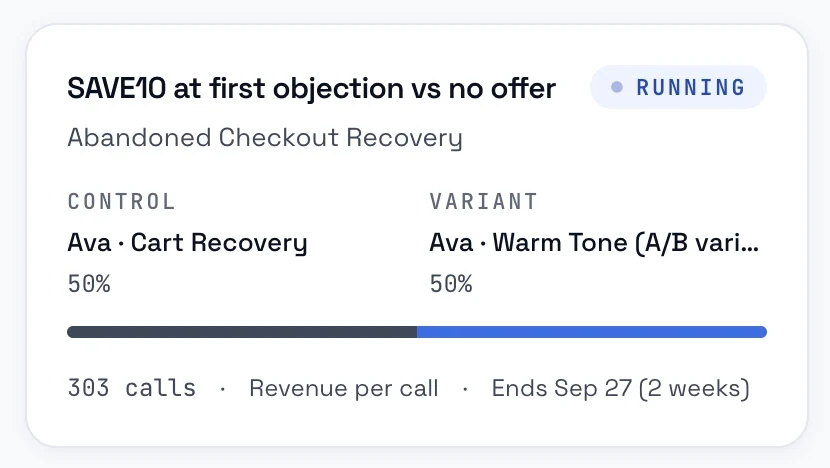
A/B tests
Two agents on the same flow
Split the traffic, watch revenue per call and promote the winner automatically.
Campaigns
Call a whole segment on your schedule
Winback, promotion or abandoned cart campaigns to any Shopify or Klaviyo segment, paced and timed so every call lands when it should.
- Any audience: Shopify segments, abandoned checkouts, inactive customers or a Klaviyo segment.
- Do-not-contact numbers left out automatically, with the reach estimate updating as you choose.
- Your clock: a campaign time zone, a daily calling window and a pace in calls per minute.
- No surprises on spend: a credit estimate before launch, and the campaign pauses when credits run out and picks up when you top up.
Every call is credited to the campaign that made it.
Agent builder
Build an agent and see its score before it calls anyone
Pick the voice, write the instructions with an assistant, switch on objectives and guardrails, and decide which discounts it may offer and when it hands off. Then check the prompt score.
Objectives
Templates for sales, support and abandoned carts, plus a library of fourteen, from building trust to a smooth handoff. Add your own.
Guardrails
Strict, standard or minimal, over fourteen rules: no made-up answers, no financial advice, stop when they ask for a person, say it's an AI when asked.
Objection handling
Ten common objections with answers ready, from price to trust to timing, and clear rules for when to stop or pass the call on.
Limits and handoffs
A cap on calls per customer, only the discount codes you allow, and a warm transfer to your team during support hours.
Prompt assistant
Describe what you want in plain words and it rewrites the instructions, or builds them from your tone, products and offer.
Test console
Enter your number and the agent calls you now. Test calls stay out of your analytics.
Prompt score
Calibrated on real calls and the orders that followed them.
- Turn-taking and pacing33/36
- Structure and economy30/35
- Grounding and persona9/12
- Call control6/9
- Objection handling8/8
Biggest wins
- +3Has a voicemail branch
- +2Handles silence
- +2Spells out discount codes
Voices and languages
It sounds like your store
- Natural voices with different accents and genders, recommended picks and a speaking speed you set.
- 32 languages: English, Spanish, Arabic and 29 more.
- Your own voice: on the Scale plan, a custom voice trained on your own recordings.
- English
- Español
- العربية
- +29 more
Simulator
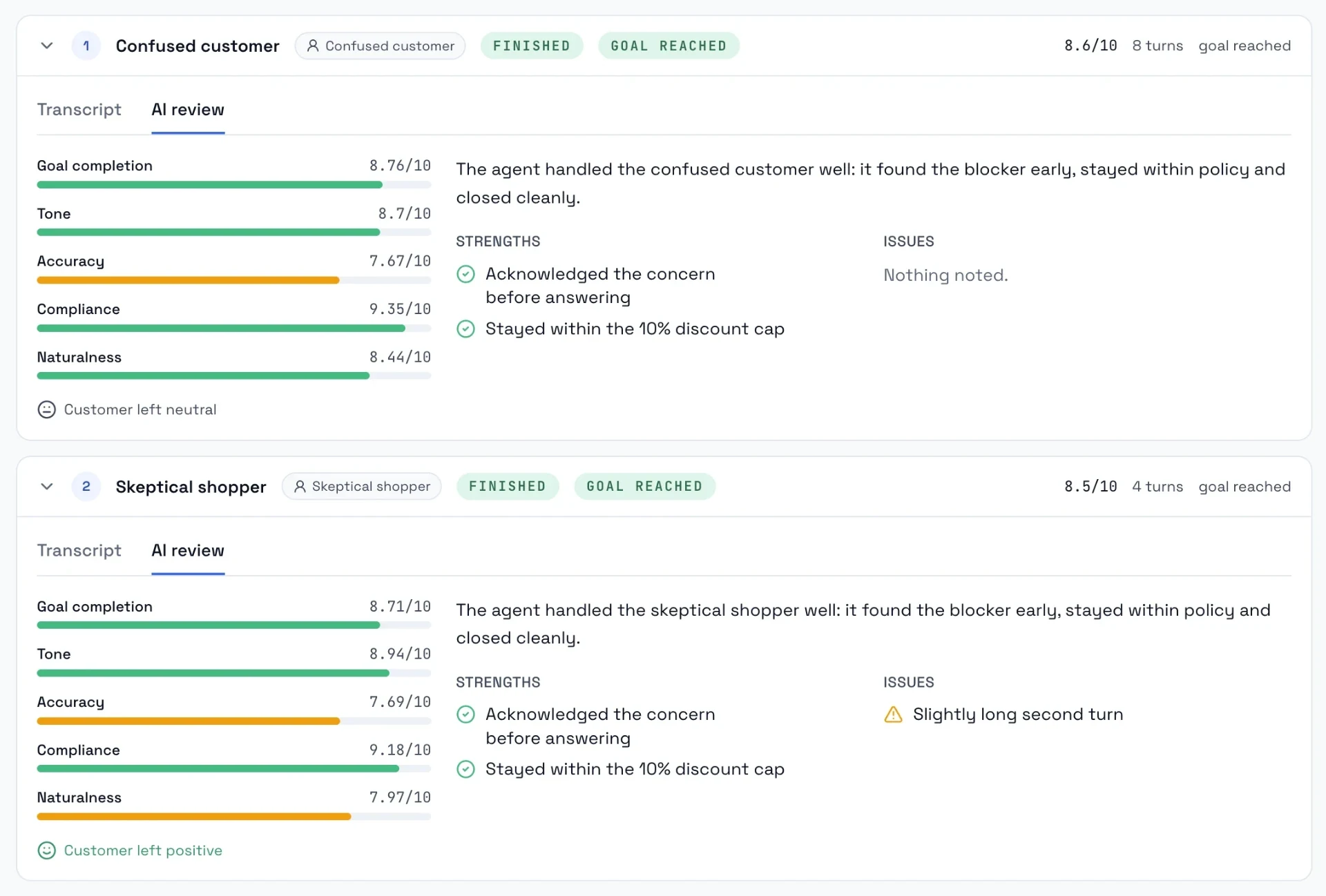
Rehearse the hard calls before a customer picks up
Run your agent against an angry customer, a skeptic and someone who asks if it's a robot. Get a score, the transcript and the exact prompt edits to make. Nothing is dialed and nothing is charged.
- Six built-in customers, and you can save your own or write one on the spot.
- Up to ten conversations per run, side by side. Each run keeps a copy of the prompt, so runs stay comparable after you edit.
- Scored on goal completion, tone, accuracy, compliance and naturalness, with a review of strengths, issues and the changes to make.
- Ready buyerWants to finish the order
- Angry customerUpset about a charge
- Rushed customerHas thirty seconds
- Skeptical shopperDoubts the product
- Confused customerLost at checkout
- Suspicious of AIAsks if it's a robot
Knowledge base
Your agent reads your store before it calls
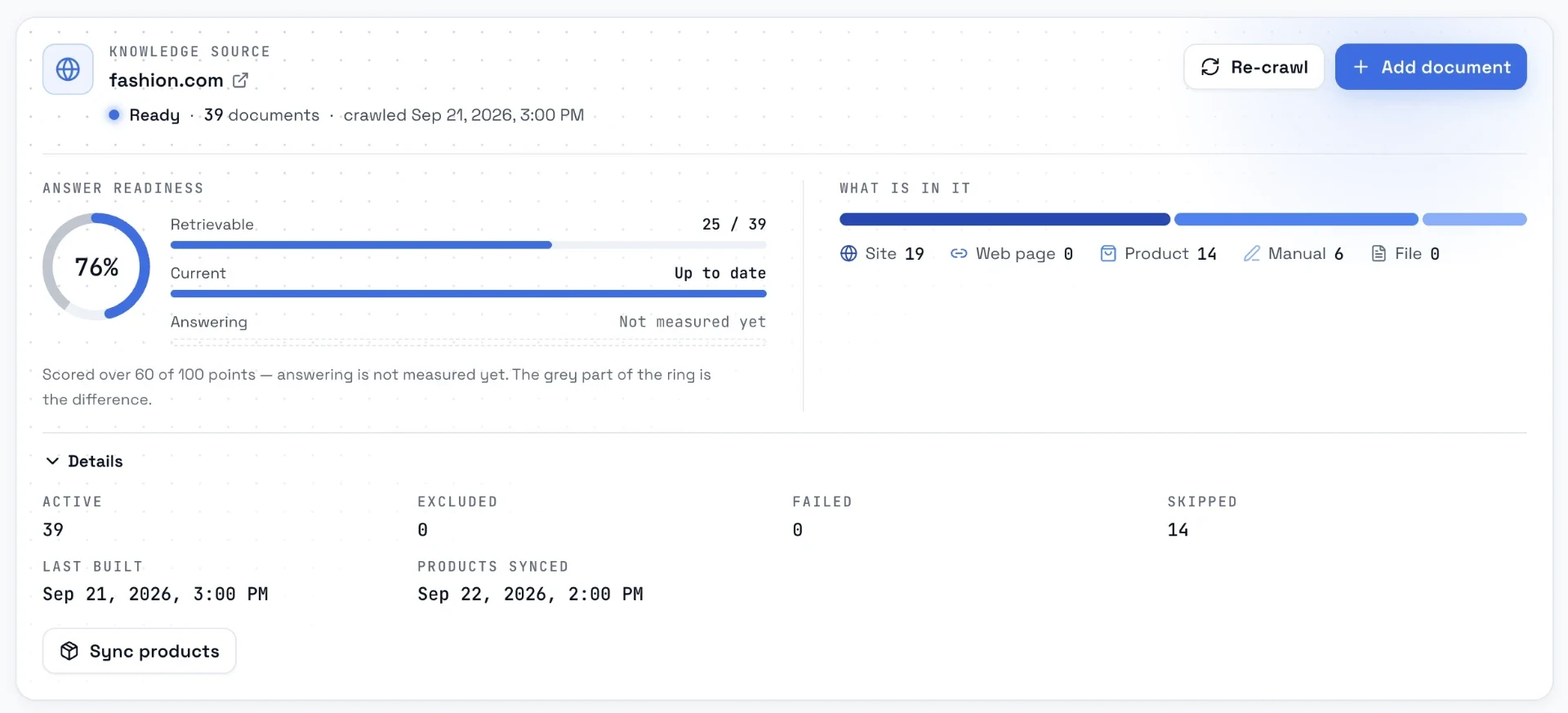
Loop Voice crawls your site, syncs your catalog, scores how ready the agent is to answer and shows you the questions customers asked that it couldn't.
- Pages, policies and FAQ crawled and products synced. Crawl again any time.
- Answer gaps: real questions from live calls that found nothing, over 7, 30 or 90 days.
- Retrieval test: type what a customer would ask and see exactly what the agent gets back.
- Everything else goes in as a PDF, DOC or text file.
- Do you ship to Canada?
- Can I change the color after ordering?
- Is there a warranty on the frame?
Questions from live calls that found no answer
Numbers
Call from a number your customer recognizes
The Super Number gives you a local caller ID in every US state, automatically. Or buy numbers in 90+ countries, import your own from Twilio or bring a SIP trunk.
- Super Number: each call goes out from a number that matches the customer's area code, drawn from a rotating pool.
- Your numbers, your way: buy in 90+ countries with voice and SMS ready in seconds, import from Twilio, or connect a SIP trunk from Twilio, Vonage or Telnyx.
- The details handled: caller ID name registration, and recording on or off per number.
- +1 (415) San Francisco
- +1 (212) New York
- +1 (305) Miami
- +1 (512) Austin
- +1 (312) Chicago
- +1 (206) Seattle
Inbound
Customers call and the agent picks up
Inbound calls get the same voice, objectives, guardrails and knowledge as your outbound calls. A customer you called this week gets the same agent back, mid-conversation.
- Handles the everyday: order status, returns and exchanges, sizing, shipping and subscription changes.
- Hands off in writing: anything it can't solve becomes a ticket with the transcript, the order and the recording, in Loop Voice, Gorgias, Zendesk or Redo.
- Transfers live to your team during support hours, with a short brief first.
Where's order #10428?
It shipped this morning. Want me to text you the tracking link?
Resolved in 41s · no handoff
What it handles
- Order status
- Returns and exchanges
- Sizing
- Shipping
- Subscription changes
Loop IQ
Ask your account a question and approve the fix
Loop IQ reads your agents, flows, campaigns, calls and spend, and answers with your real numbers. Each week it names the one change worth making, with the setting a click away.
- Ask mode: how revenue is doing, which discount codes fail Shopify's check, whether an agent's setup looks off.
- Act mode: describe a change in plain words. Loop IQ drafts it, shows you exactly what it changed and waits.
- You approve every change. Nothing moves until you say so.
How is revenue doing this week?
Answer rate 9.8%, down 2 points on the prior week.
Median 14 hours from abandon to first dial.
RecommendationBring the abandoned cart delay down to 15 to 30 minutes.
Stop offering the discount before minute two.
- offer_discount: on_first_objection+ offer_discount: after 120sInsights
Reports that tell you what to change next
Insights scores every conversation with a real person, maps the hours customers pick up, follows the path from cart to call to order and ranks the changes worth making. How each number is counted is written on the page.
- Scored, not guessed: answer rate, call success, customer airtime and quality, each against the prior period.
- Why calls failed: who answered (a person, voicemail, a call screener or no one), pickup by attempt and by caller ID, and the time from abandon to first dial.
- Tied to the order: revenue matched to the Shopify order number within an attribution window you set, by flow, campaign, channel and cart value.
- 32.3%Pickup
- 54.8%Success when picked up
- $5,352Attributed revenue
Who answered
- Voicemail41%
- A person32%
- No answer18%
- Unreachable7%
- Call screener2%
Inbox
The whole story of every customer in one thread
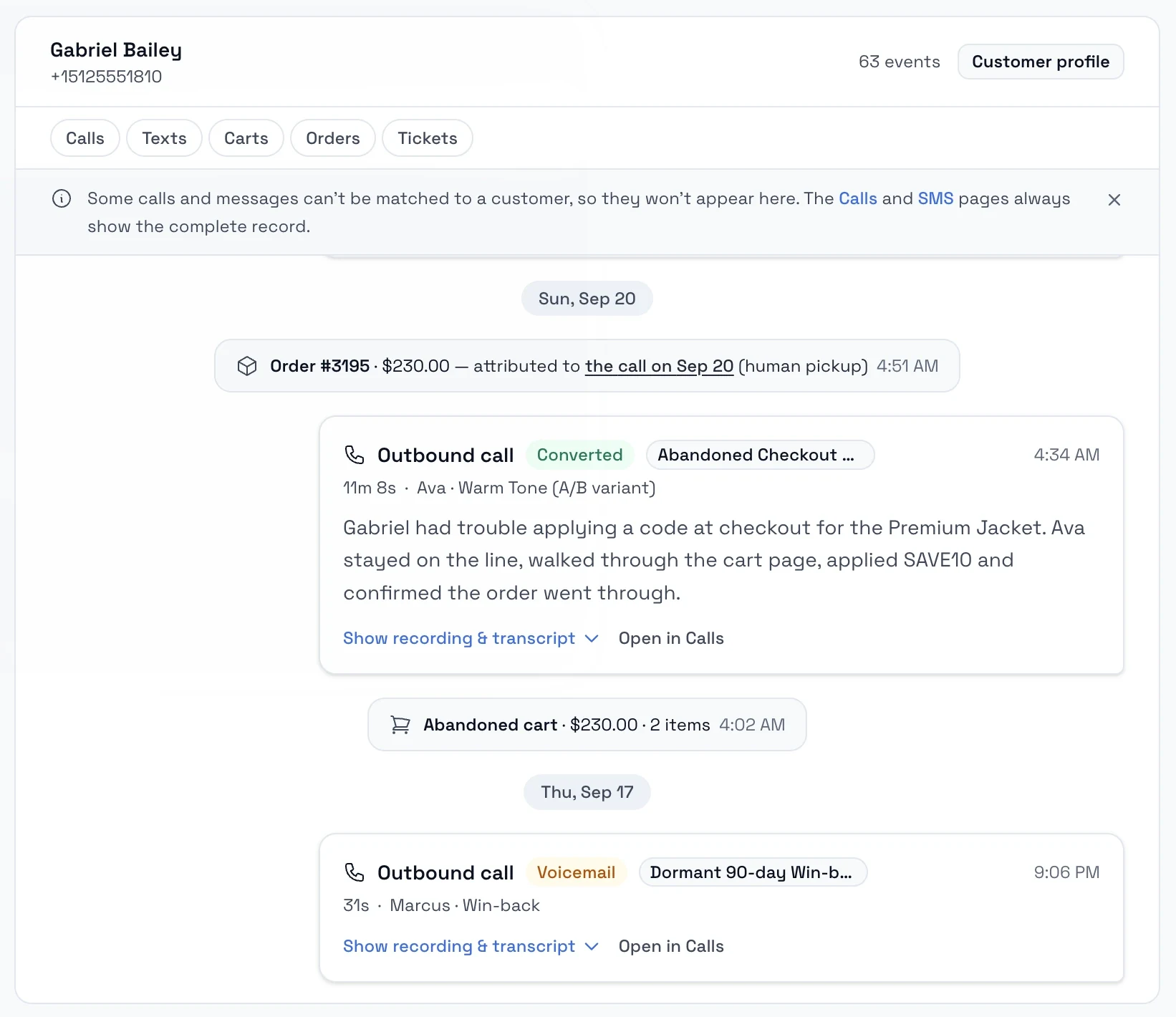
Open a customer and read it in order: the cart they left, the call that went to voicemail, the text that brought them back and the order that followed.
- Every call on record: the recording (kept 7 to 90 days), the transcript, a short summary and notes on objections, pain points and next steps. Search, filter and export to CSV.
- Every text with its revenue: content, delivery status and the revenue each message produced.
- Escalations arrive written: a ticket with the summary, the order and the recording attached.
- A profile per customer: revenue Loop Voice brought in next to their lifetime total, orders, abandoned checkouts and the flow they're in.
Call details
- Revenue
- +$142.00 (#10428)
- Duration
- 2:14
- Answered by
- A person
- Outcome
- Converted
- Objection
- Shipping cost
Compliance
Controls that keep every call on the right side of the line
Opt-out handling
STOP by text, 'don't call me' on the call or a carrier block. Each one lands on the do-not-contact list before the next step runs.
Nobody gets called again after saying no.Do-not-contact list
Honored by every flow, campaign and text. Each entry keeps its reason and an audit trail.
Customer request, manual, call sentiment or regulatory.Stop conditions
Flows stop on an order, a do-not-contact request or a negative call. Campaigns drop listed numbers before the first dial.
Set per flow.Frequency caps
A maximum number of calls per customer per week, month, quarter, six months or year, set per agent.
No customer hears from you more than you allow.Quiet hours and windows
Store hours per day, an optional calling window and campaign windows, all in each customer's own time zone.
One setup for every time zone.Recording control
Recording on or off per number. Recordings are kept 7 days by default and up to 90.
Match the rules where you sell.
- TCPA
- GDPR
Integrations
Works with the tools you already run
Store events start the calls, audiences feed the campaigns, help desks take the handoffs and your phone provider can carry the calls.
Store events
- Shopify
- WooCommerce
- BigCommerce
- Magento
- Shopline
- Checkout Champ



Audiences
- Klaviyo

Help desks
- Gorgias
- Zendesk
- Redo


Phone numbers
- Twilio
- Vonage
- Telnyx
- Any SIP trunk


Results
What stores see
- ~20%more pickups with Super NumberPer call, from our October 2026 benchmark. Results vary by store.
- 10 minfrom install to the first callsDepends on how your store is configured.
- 12×average return on spendBased on average performance across active merchants.
Our customers have a lot of questions before they commit to a hearing aid. Loop answers those questions live on the call and converts customers who would have just disappeared.
Loop's voice agents are recovering abandoned carts that our email flows never could have converted.
5.0 on the Shopify App Store · 200+ merchants · 100,000+ calls placed
Is Loop Voice only for abandoned carts?
No. Cart recovery is one of six plays. Loop Voice also runs post-purchase upsells, winbacks, review requests and subscriber check-ins, and it answers your inbound calls with the same agent, objectives and guardrails.
Will calls annoy my customers?
Calls only go out inside your calling windows, in each customer's own time zone. Anyone who says stop goes on the do-not-contact list before the next step runs, and you cap how often a customer can be called.
How is a call different from email or SMS?
A call is a conversation: the agent answers questions and handles objections on the spot. It reaches people who ignore email and texts, and every call can be followed by a text with the checkout link and the offer.
How long does setup take?
Under 10 minutes. Connect your store, pick your plays and voice, set your calling windows, and the first calls go out. Most merchants see their first attributed order within 24 to 48 hours. See how setup works.
Can I test the agent before it calls real customers?
Yes, two ways. The Simulator runs your agent against AI customers and scores each conversation, with nothing dialed and no credits used. The test console calls your own phone with the details filled in.
What does the agent know about my store?
Loop Voice crawls your pages and policies and syncs your catalog into a knowledge base, scores how ready it is to answer and lists the questions customers asked that it couldn't. You can upload PDF, DOC or text files and add notes.
Can I use my own voice?
Pick from natural voices with different accents, in English, Spanish and 30 more languages. On the Scale plan, Loop Voice can train a custom voice on your own recordings.
Is my store and customer data safe?
Loop Voice reads only the data it needs to run your plays, stores no card data and encrypts everything in transit and at rest. Recording can be switched off and customer data deleted on request. More on the security page.
Who approves what Loop IQ changes?
You do, every time. Loop IQ answers questions in Ask mode. In Act mode it drafts the change, shows you the exact difference and waits for your approval.
Live on your store in under 10 minutes
Install from the Shopify App Store, or book a demo and hear a live call on your own store first.